Work Smarter Not Harder with These Useful Smart Home Devices
Homepage Work Smarter Not Harder with These Useful Smart Home Devices
Work Smarter Not Harder with These Useful Smart Home Devices
Your House Is Probably Smarter Than You Think — But Not Smart Enough
Useful smart home devices are tools that connect to your home’s network and automate everyday tasks — from turning off lights to alerting you when your basement floods.
Here are the most useful ones to start with:
Device
What It Does
Cost Range
Smart plug
Controls any appliance remotely; tracks energy use
$10-$15
Contact sensor
Alerts you when doors, windows, or the fridge open
$8-$12
Smart wall switch
Replaces light switches with app and voice control
$15-$50
Temp/humidity sensor
Automates fans and humidifiers by room conditions
$6-$10
Smart lock
Keyless entry, auto-lock, remote access
$150-$250
Video doorbell
See and speak to visitors from anywhere
$50-$200
Wireless mini-switch
One button triggers multi-step routines
$10-$15
Most people think a smart home means buying a $500 thermostat or rewiring the whole house. It doesn’t.
The truth is, the most impactful upgrades often cost less than lunch. A $10 contact sensor on your fridge door can alert you before spoiled food costs you hundreds. A $15 smart plug can tell you when the laundry is done — no more forgotten wet clothes.
But knowing where to start is the hard part. The sheer number of devices, protocols, and ecosystems makes it easy to buy the wrong thing, end up with incompatible gadgets, or spend more than you need to.
This guide cuts through that noise.
I’m Ally Wise, a sales manager at The Wise Buy with hands-on experience sourcing and evaluating useful smart home devices across every budget and use case. I’ll walk you through exactly what’s worth buying, what to skip, and how to build a setup that actually makes your life easier.
Introduction
Building a modern living room isn’t just about picking the right sofa; it’s about creating an integrated smart technology ecosystem. The Internet of Things (IoT) has evolved from a futuristic concept into a practical reality that can solve everyday annoyances. Whether you are in Buffalo Grove, IL, or anywhere else looking for “smart deals,” the goal is the same: making your home work for you, rather than the other way around.
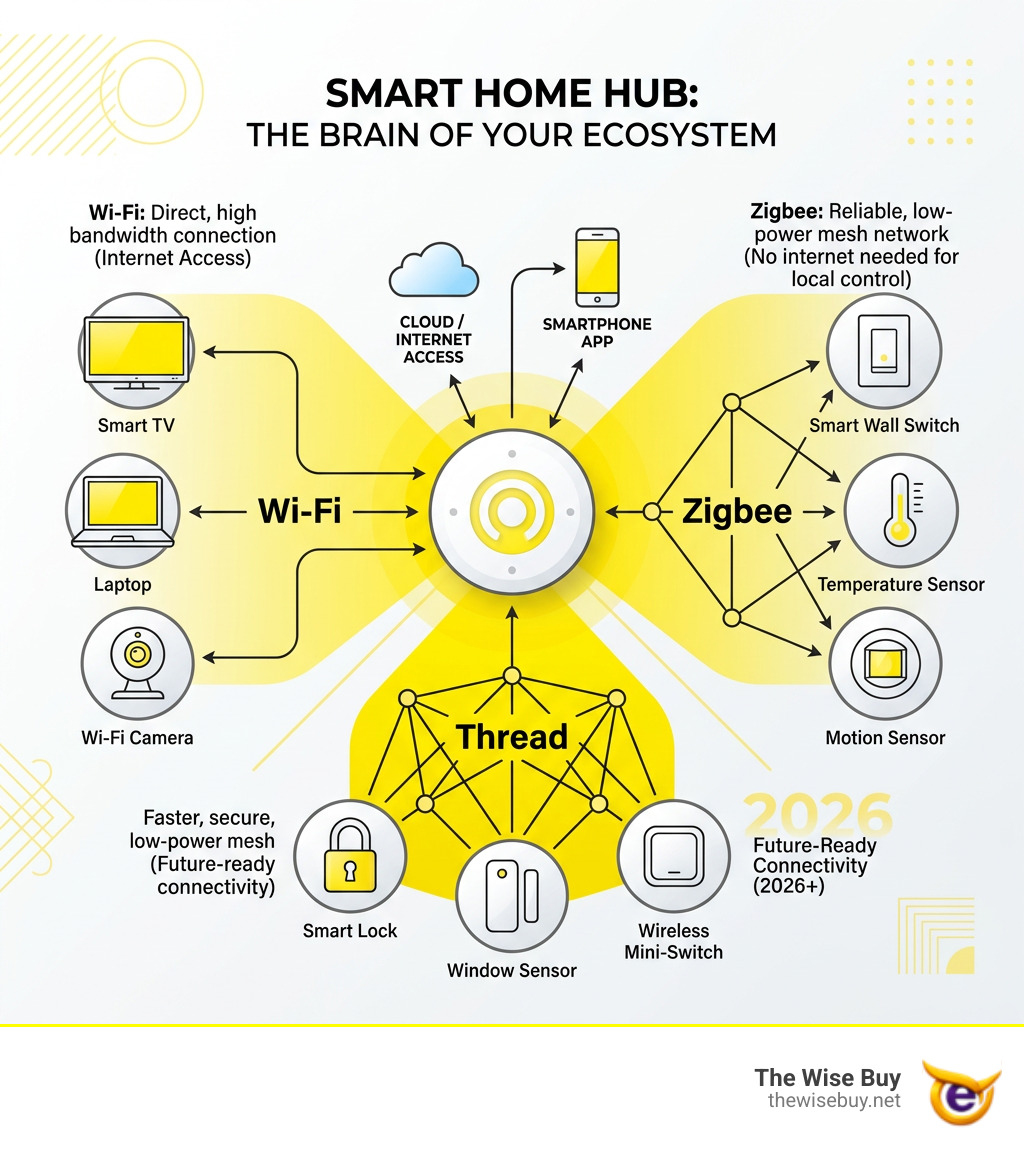
At its core, a smart home relies on a central hub—the “brain” of the operation—to connect various devices. This allows a motion sensor in the hallway to talk to the smart bulb in the bathroom, or a leak detector under the sink to shut off your water main. When we talk about useful smart home devices, we aren’t talking about gadgets that just look cool; we’re talking about tools that provide tangible value in security, energy savings, and convenience.
The Foundation: Essential Useful Smart Home Devices for Beginners
For those just starting, the “big three” are smart lighting, smart plugs, and voice assistants. These are the entry points because they offer the most immediate “wow” factor for the lowest investment.
Smart Lighting: Instead of just buying smart bulbs, we often recommend smart wall switches. Why? Because if someone flips a physical switch off, a smart bulb loses power and becomes “dumb.” A smart switch keeps the connection alive while allowing you to use voice commands or apps.
Smart Plugs: These are the Swiss Army knives of home automation. Plug in a “dumb” coffee maker or a space heater, and suddenly you can schedule them to turn on before you even hit the floor in the morning.
Voice Assistants: Whether you prefer Alexa, Google Assistant, or Siri, having a central way to shout “Turn off all lights” as you head out the door is a game-changer.
Energy Monitoring: Many modern smart plugs, like the Sonoff S31 or Third Reality Gen 2 (usually priced between $10-$15), include energy monitoring. This allows you to see exactly how much power your old fridge is sucking up or get a notification when the washing machine’s power draw drops below 2W, signaling the cycle is done.
Why Protocol Choice Matters for Useful Smart Home Devices
If you’ve ever had a Wi-Fi smart bulb “drop off” the network, you know the frustration of poor connectivity. This is why understanding protocols like Zigbee, Z-Wave, and Thread is vital.
Wi-Fi: Great for one or two devices, but too many can congest your router.
Zigbee/Z-Wave: These create a “mesh network” where each device acts as a repeater, strengthening the signal as you add more. They are also known for being more energy-efficient, meaning battery-powered sensors last much longer.
Thread/Matter: This is the new gold standard. Thread technology allows for fast, reliable, and low-power communication without needing a specific manufacturer’s bridge. Matter is the “language” that lets these devices talk to each other regardless of whether you use an iPhone or an Android.
Smart Plugs and Energy Management
The real magic of useful smart home devices lies in tackling “phantom loads”—that electricity your TV or computer uses even when “off.” By using app scheduling, we can ensure these devices are completely cut off at night.
Practical tip: Use a smart plug with energy monitoring on your dehumidifier. You can set an automation to turn it off when the room humidity hits 45% and back on at 55%, ensuring you aren’t running the motor unnecessarily and spiking your utility bill.
Connectivity Decoded: Wi-Fi vs. Local Mesh Networks
Choosing the right backbone for your home is the difference between a system that works and one that requires constant rebooting.
Feature
Wi-Fi
Zigbee
Z-Wave
Thread
Hub Required
No
Yes
Yes
Yes (Border Router)
Battery Life
Low
High
High
Very High
Range
Limited to Router
Mesh (Scalable)
Mesh (Scalable)
Mesh (Scalable)
Interference
High (2.4GHz)
Moderate
Low (908MHz)
Moderate
Building a Reliable Mesh with Useful Smart Home Devices
A common pitfall is placing a sensor too far from the hub. In a mesh network, any “plugged-in” device (like a smart plug or switch) usually acts as a signal repeater. If your backyard contact sensor is struggling, simply adding a smart plug in the kitchen can bridge that gap.
For those worried about reliability, Zigbee standards have been tested to support hundreds of devices on a single network without the lag often seen in Wi-Fi-heavy setups. This is especially important in areas with high interference, such as apartment buildings.
The Benefits of Local Control
Most “big brand” smart devices rely on the cloud. If your internet goes out, your “smart” home becomes a brick. Local control (using protocols like Zigbee or Z-Wave via a hub like Home Assistant or Hubitat) means your automations happen inside your four walls. This reduces latency (the light turns on instantly when you move) and significantly enhances privacy, as your data isn’t being sent to a server halfway across the world.
Enhancing Security and Safety with Smart Technology
Security is often the primary reason people look for useful smart home devices. A secure home starts at the perimeter.
Protecting Your Entryways with Useful Smart Home Devices
Beyond just locking the door, smart technology offers “DoorSense” features. A contact sensor (like the IKEA Myggbett or Sonoff SNZB-04P, usually $8-$12) can tell you if the door is actually closed, not just if the bolt is thrown.
If you prefer a different finish to match your hardware, the Honeywell Satin Nickel Single Cylinder Electronic Deadbolt with Lighted Keypad offers the same high-security features with a classic look. These devices allow for “auto-lock” timers, so you never have to turn the car around because you “think” you forgot to lock the door.
Environmental Safety and Hazard Prevention
The most “useful” device is the one that prevents a disaster.
Leak Detectors: Placing a $15 sensor under your kitchen sink or near the water heater can save you thousands in flooring repairs.
Smart Smoke Alarms: Unlike traditional alarms that just beep, these send a notification to your phone. If you’re away and the alarm triggers, you can call the fire department immediately.
Freeze Alerts: For our neighbors in Buffalo Grove, IL, a temperature sensor in the basement can alert you if the temp drops below 40°F, giving you time to drip the faucets before pipes burst.
Practical Automations for Every Room
The goal of a smart home is to make things happen without you thinking about them.
Your environment dictates your sleep quality. According to CDC research, the ideal sleeping temperature for most people is between 65 and 68 degrees Fahrenheit.
Climate Control: Use smart thermostats with remote sensors to ensure your bedroom—not just the hallway where the thermostat is located—stays at that perfect 67°F.
Adaptive Lighting: Set your bedroom lights to a warm, dim amber at 9:00 PM to signal to your brain that it’s time to wind down.
Smart Shades: Program your shades to open at 7:00 AM, letting in natural light to help you wake up without a jarring alarm clock.
Kitchen and Living Room Convenience
The kitchen is the heart of the home, and it’s where smart displays really shine. An Echo Show or Nest Hub can display recipes, set multiple timers for dinner, and even show you who is at the front door while you’re chopping onions.
The “Fridge Guard”: A contact sensor that alerts your phone if the fridge door has been left open for more than two minutes.
Smart Coffee: Use a smart plug to pre-heat your espresso machine 15 minutes before your alarm goes off.
Robot Vacuums: Set your Roomba or Tapo vacuum to run only when the “Last Person Leaves” geofence is triggered, so you always come home to clean floors.
Frequently Asked Questions about Smart Homes
What are the best smart home devices for renters?
Renters should focus on “plug-and-play” devices that don’t require permanent modifications. Smart plugs, wireless contact sensors (which use adhesive), and smart bulbs are perfect. For security, the August Wi-Fi Smart Lock is a favorite because it only replaces the interior part of your deadbolt, allowing you to keep your original keys and keep the landlord happy.
Do smart home devices significantly reduce electricity bills?
Yes, but only if used strategically. A smart thermostat can save roughly 8% on heating and cooling costs. However, the real savings come from automation—ensuring lights are never left on in empty rooms and using smart plugs to kill “vampire power” from electronics. Using energy-monitoring plugs to identify which of your older appliances are “energy hogs” is the first step toward a lower bill.
How do I prevent my smart home from being hacked?
Security is a valid concern. To protect your home:
Use Two-Factor Authentication (2FA) on all smart home accounts.
Create a Guest Network: Put your smart devices on a separate Wi-Fi SSID so they can’t access your main computer or phone data.
Prefer Local Control: As mentioned, devices that don’t need the cloud are inherently more secure because they don’t “talk” to the outside internet.
Conclusion
At The Wise Buy, we believe that home improvement shouldn’t be a headache. Whether you’re looking for “smart deals” on essential sensors or “smarter shopping” for advanced security systems, the key is to start small and build a system that solves your specific problems.
Don’t feel pressured to buy everything at once. Start with a few useful smart home devices—perhaps a smart plug for the space heater and a contact sensor for the front door. As you see the benefits in your utility bill and your peace of mind, you can expand your ecosystem.
Ready to take the next step in future-proofing your home? Upgrade your home with Harbor Breeze solutions and other top-tier brands available at The Wise Buy. We’re here to help you turn your “dumb” house into the smartest one on the block.

 Add more eligible items to your cart to unlock free shipping.