Selecting the ideal pet camera monitor means balancing crisp video performance with features tailored specifically to your home environment. While hardware capabilities like 1080p resolution, smooth pan-and-tilt tracking, 30-foot infrared night vision, and two-way audio are baseline requirements, the actual room environment plays a huge role in performance.
When pets move around, they stir up dander, fur, and dust that can drift past the camera lens and trigger false motion alerts. Integrating air quality solutions like the Levoit Core 300 RAC White HEPA Air Purifier 222 sq ft room near primary pet zones keeps airborne particles down, resulting in clearer footage, fewer false alarms, and a cleaner home overall.
Pet-Specific Features vs. Traditional Home Security
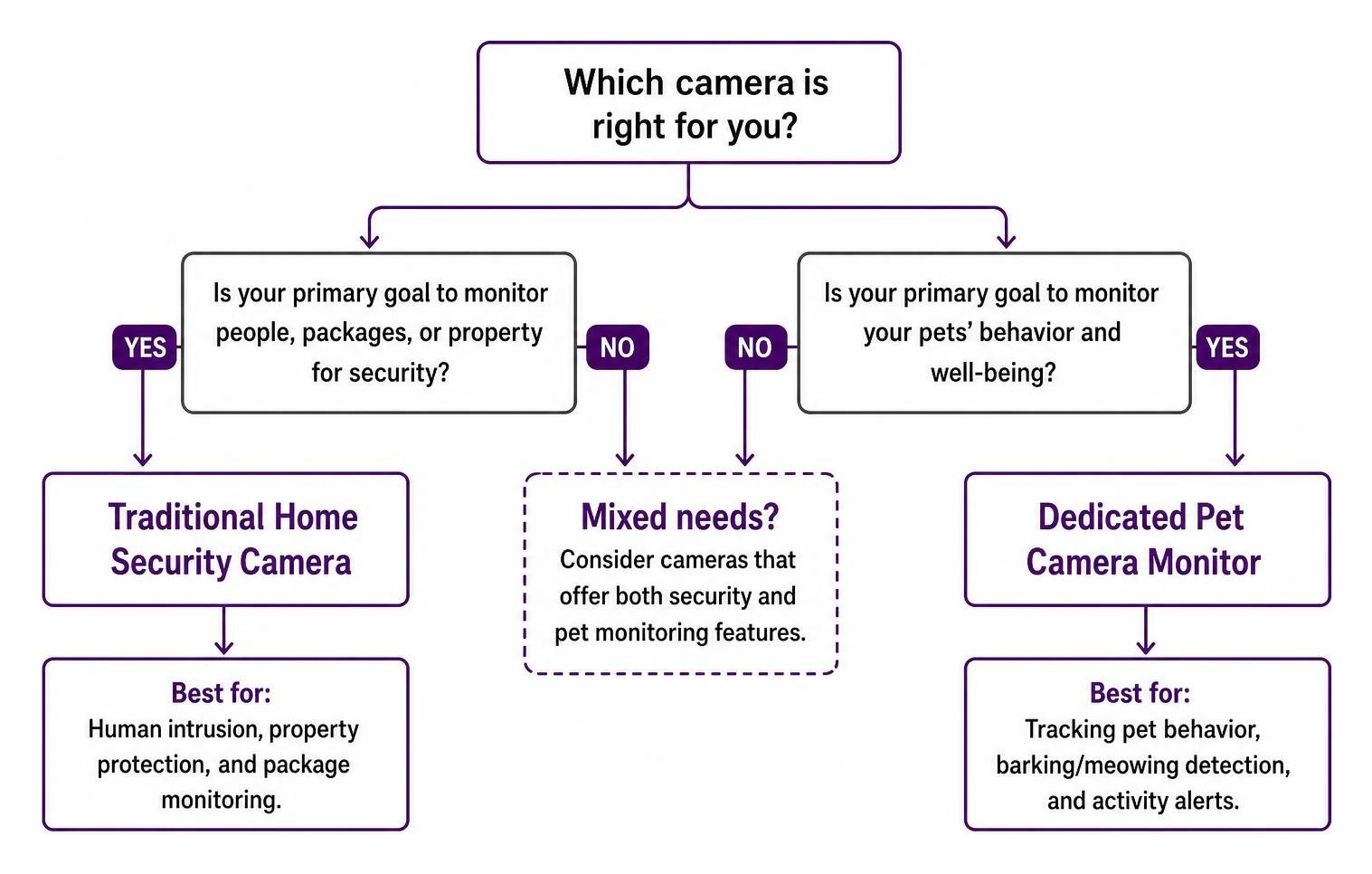
Many pet parents wonder if they should buy a specialized pet camera or rely on a standard smart home security camera. Both categories can stream high-definition live footage, but their detection algorithms differ fundamentally.
Traditional security cameras focus on detecting human movement and filtering out animal activity. In contrast, dedicated pet monitoring systems use specialized AI algorithms designed specifically to track animal behavior. Instead of triggering a general motion alert when your dog walks past, a dedicated pet camera identifies whether your dog is pacing, barking, or resting. For cat owners, AI tracking can distinguish between normal lounging and active meowing or destructive scratching.
Feature
Traditional Security Camera
Dedicated Pet Camera Monitor
Primary Focus
Human intrusion & vehicle motion
Animal motion, barking, and meowing
Audio Recognition
Glass break & smoke alarm sounds
Barking, howling, meowing, & distress
Interactive Tools
Siren & floodlights
Treat dispensing & laser toys
Alert Types
Motion zone intrusion
Dog activity, cat movement, & pet separation
Dog vs. Cat Needs: Features That Matter for Your Pet Camera Monitor
Dogs and cats interact with their environment—and camera technology—in completely different ways. Matching camera features to your pet’s specific species and personality ensures you get real value from your investment.
What Matters Most for Dog Owners
Treat Tossing: Dogs respond exceptionally well to positive reinforcement. Tossing a treat remotely helps relieve separation anxiety and rewards good behavior when you’re away.
Bark and Howl Detection: Real-time audio alerts notify you if your dog is barking, helping you intervene via two-way audio before neighbors complain.
Low-Angle / Wide-Angle Pan-Tilt: Dogs spend most of their time on floors and furniture, requiring a camera with flexible panning capabilities.
What Matters Most for Cat Owners
High-Angle Mounting: Cats love elevated perches like cat trees, bookshelves, and countertops. Mounting a camera high with a wide-angle tilt ensures you don’t lose sight of them.
Laser Toys: Some interactive units include remote-controlled laser pointers to give indoor cats exercise. However, automated laser features should be used cautiously to avoid over-stimulating or frustrating your feline friend.
Meow and Activity Alerts: Detecting subtle vocalizations or sudden nighttime activity spikes helps cat owners catch signs of distress or medical issues early.
Comparing Top Pet Camera Models: Furbo 360, Petcube Cam, and Tapo C120
To help you decide which hardware best fits your budget and home setup, we compared three of the most popular models on the market: the Furbo 360 Dog Camera, the Petcube Cam Pet Monitoring Camera with 24/7 Online Vet, and the TP-Link Tapo C120.
Feature / Spec
Furbo 360
Petcube Cam
TP-Link Tapo C120
Video Resolution
1080p Full HD
1080p Full HD
2K QHD (1440p)
Field of View
360° Pan-Tilt
110° Fixed Wide-Angle
120° Fixed Wide-Angle
Treat Dispenser
Yes (Multi-angle toss)
No (Available on Bites model)
No
Two-Way Audio
Yes (Full Duplex)
Yes (8x Digital Zoom)
Yes (Noise Canceling)
Local Storage
No
No
Yes (microSD up to 512GB)
Free Tier Features
Live view, 2-way audio
Live view, 2-way audio
Motion/Pet AI detection, local saving
Subscription Cost
Optional paid cloud plan
Optional Petcube Care
Optional Tapo Care (Not required)
Unique Highlight
Barking alerts & treat tossing
Direct 24/7 online vet chat access
Weather-resistant, high resolution, budget price
Each of these choices serves a different primary purpose:
Furbo 360: The gold standard for interactive dog monitoring. Its 360-degree rotation means zero blind spots, and the treat-dispensing launcher keeps dogs engaged throughout the day.
Petcube Cam: Highly rated (4.5/5 stars from over 19,000 customer reviews), this compact camera packs a 110-degree field of view, 8x digital zoom, and 30-foot night vision. Its stand-out feature is built-in integration with 24/7 online veterinary consultation.
TP-Link Tapo C120: Highly recommended by independent testers as a budget-friendly option. It offers sharp 2K video, indoor/outdoor versatility, and built-in AI pet detection that works without a monthly subscription fee.
Interactive Gadget Limitations: Treat Dispensers and Lasers
While remote treat launching and automated laser toys sound fantastic on paper, they come with practical trade-offs that pet owners should consider before buying:
Treat Jamming and Maintenance: Treat dispensers require specific treat sizes and shapes to function properly. Moister treats can leave oily residues inside the mechanism, leading to clogs or mold growth if not cleaned regularly.
Behavioral Over-Arousal: Tossing treats or activating laser pointers can excite high-anxiety dogs or cats, causing pacing or barking at the camera in anticipation of the next reward.
Hardware Durability: Standalone treat dispensers are top-heavy. Unsecured units left on low tables can easily be knocked over by determined dogs.
Subscriptions, Connectivity, and Cellular Travel Options
Setting Up Your Pet Camera Monitor and Connectivity Requirements
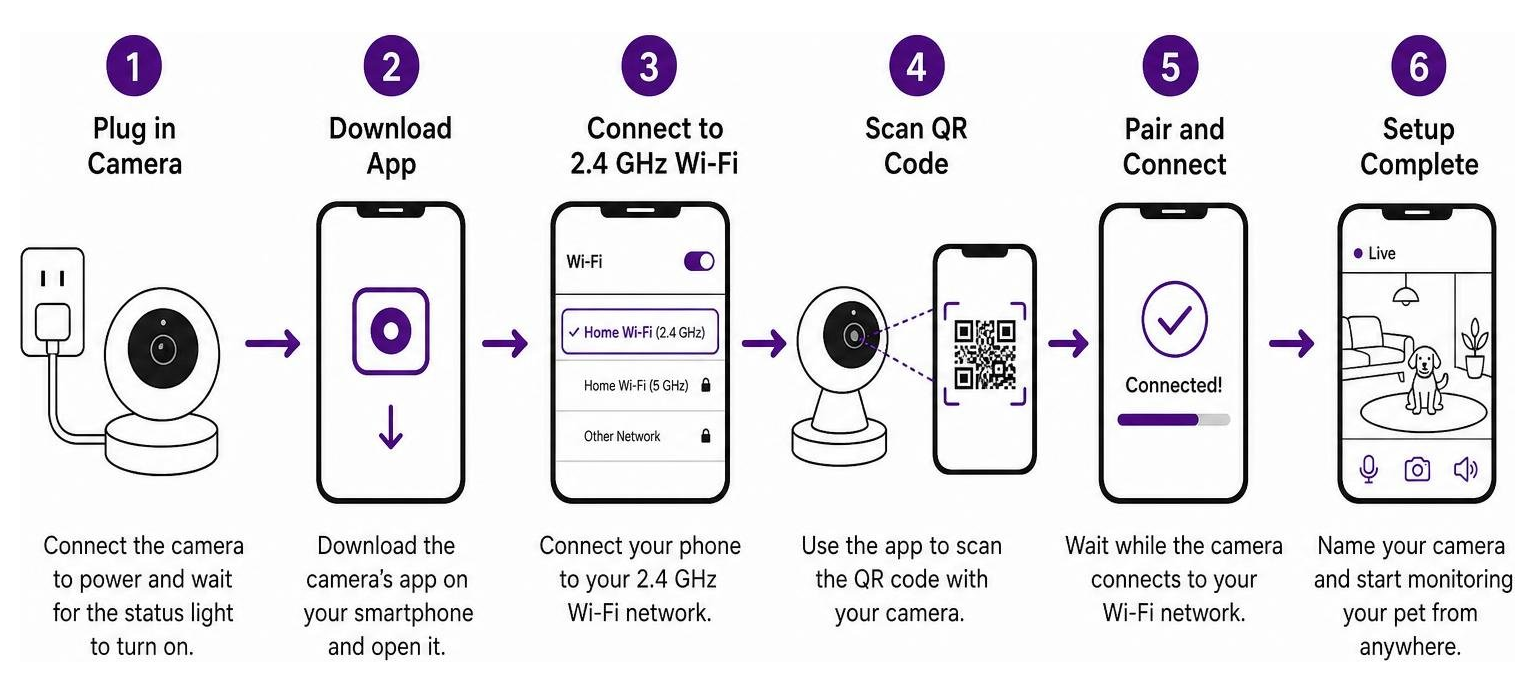
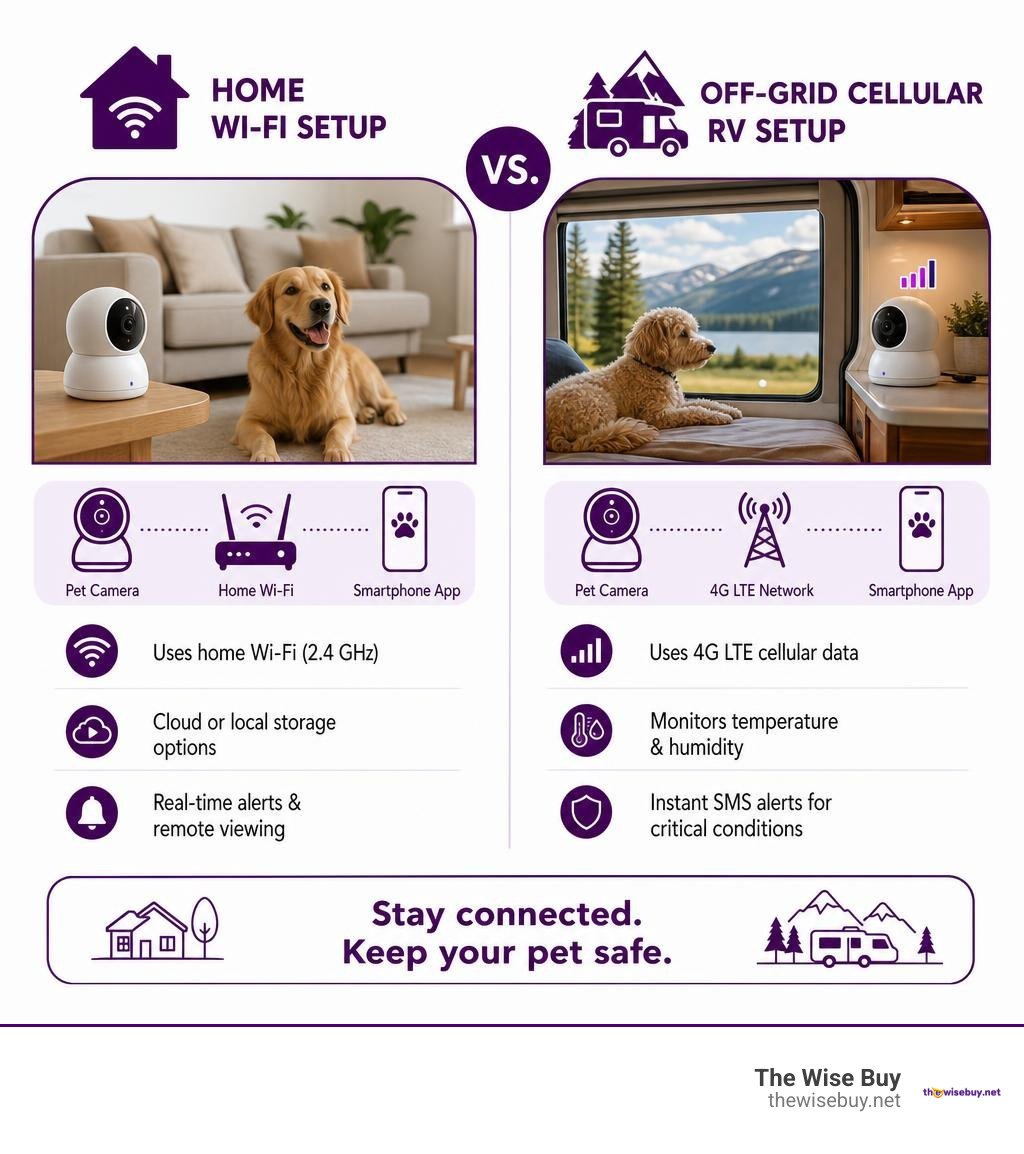
Most smart pet camera monitor devices connect over standard 2.4 GHz Wi-Fi networks because 2.4 GHz signals penetrate walls and furniture better than 5 GHz bands.
During setup, ensure your mobile device is connected to your router’s 2.4 GHz network. Most mobile apps will guide you through scanning a QR code generated on your phone screen using the pet camera’s lens. Once linked, you can mount the device using rubber foot grips, wall brackets, or heavy-duty mounting tape.
Subscription-Free Options vs. Cloud Storage Plans
One of the biggest questions buyers face is whether a camera requires an ongoing monthly fee.
Subscription-Free Models (e.g., TP-Link Tapo C120): Store video clips locally onto a microSD card inside the camera. You get full access to live viewing, motion notifications, and pet detection alerts without paying a monthly fee.
Cloud-Based Subscription Models (e.g., Furbo Nanny, Petcube Care): Process footage in the cloud to offer advanced features like automated daily video summaries, smart emergency audio detection (glass breaking or fire alarms), and continuous multi-day video history.
Monitoring Pets Without Wi-Fi: Cellular Solutions for RVs and Travel
If you travel with pets in an RV or leave them safely inside a parked camper, home Wi-Fi won’t be available. Specialized monitoring solutions utilize 4G LTE cellular data networks rather than standard Wi-Fi.
Cellular pet monitoring systems (such as Waggle or Necto) monitor interior temperatures and humidity levels alongside real-time video streaming. If an RV’s air conditioning fails or power cuts out, these systems instantly push SMS alerts to your phone, preventing life-threatening heatstroke conditions when you are away from your vehicle.
Frequently Asked Questions About Pet Cameras
Do pet cameras require a monthly subscription to work?
No, many pet cameras do not require a monthly subscription for baseline functionality. Cameras with local microSD card slots allow you to view live video feeds, receive motion notifications, use two-way audio, and record clip histories completely subscription-free. However, advanced cloud AI features—like automated daily diary highlights, smart sound identification, and extended cloud video history—typically require an optional monthly subscription plan.
Can pet cameras double as home security cameras?
Yes. Because modern pet cameras offer high-definition video, night vision, motion sensing, and two-way audio, they make effective indoor home security monitors. Many standard smart home cameras actually serve dual roles by offering AI pet detection alongside human motion detection. The main trade-off is placement: positioning a camera low to watch a sleeping pet on the floor might leave high-entry points like doors or windows outside its field of view.
What should I do if my pet camera alerts me to an emergency?
If your pet camera sends a bark alert, distress sound notification, or smoke alarm warning:
Open the camera’s live view immediately to assess the situation visually.
Use two-way audio to speak calmly to your pet if they show signs of distress or anxiety.
If you spot a medical emergency, injury, or physical danger, contact local emergency services or bring your pet to a local urgent care clinic immediately, such as a 24 Hour Emergency Vet in Buffalo Grove.
Contact a trusted neighbor or family member who holds a spare key to check on your home in person.
Conclusion
Choosing the right pet camera monitor comes down to understanding your pet’s routine, your home setup, and your budget. Whether you prefer an interactive, feature-packed unit like the Furbo 360, a vet-supported option like the Petcube Cam, or a budget-friendly local-storage camera like the TP-Link Tapo C120, having eyes on your pets provides incredible peace of mind.
Creating a healthy environment for your pets involves more than just monitoring them through a lens—it also means maintaining clean, fresh indoor air. Pairing your smart pet monitors with high-efficiency air filtration systems, such as the Blueair Blue Pure 211i Max Smart WiFi Air Purifier for Extra Large Rooms Sandstone, removes pet hair, dander, and odors from your living spaces automatically.
At The Wise Buy, we help smart shoppers make informed choices on quality tech, home essentials, and pet care products. Explore our complete selection of curated home gear and tech deals today by visiting the Smart home products at The Wise Buy Shop.

 Add more eligible items to your cart to unlock free shipping.